Look at past and future frames with a buffer
Some decisions about a frame are easier with the frames around it: a count that jumps from one
frame to the next, a detection that appears for a single frame. pf.Buffer keeps the last few
frames with their results and hands each one back a few frames late, once the frames after it
have arrived. For that frame, you have both the frames before it and the frames after it.
import pixelflow as pf
from mayaku import from_pretrained

predictor = from_pretrained("mayaku-n-det")
person = predictor.class_names.index("Person")
buffer = pf.Buffer(frames=5)
counts = []


def process(people, frame):
    context = buffer.get_temporal_context()
    window = context["past_results"] + [people] + context["future_results"]
    counts.append((len(people), sum(len(d) for d in window) / len(window)))
    writer.write(pf.annotate.box(frame, people))


video = pf.VideoReader("crowd.mp4")
with pf.VideoWriter("crowd-buffered.mp4", like=video) as writer:
    for frame in video:
        result = predictor(frame[:, :, ::-1])  # Mayaku reads arrays as BGR
        detections = pf.from_mayaku(result, labels=predictor.class_names)
        people = detections.filter_by_confidence(0.5).filter_by_class_id(person)

        people, frame = buffer.update(people, frame)
        if frame is not None:
            process(people, frame)

    for people, frame in buffer.flush():
        process(people, frame)

print(writer.frames_written)
for index in (0, 100, 200, 340):
    count, average = counts[index]
print(f"frame {index}: {count} people, {average:.1f} on average")341
frame 0: 24 people, 23.7 on average
frame 100: 29 people, 28.8 on average
frame 200: 26 people, 26.2 on average
frame 340: 21 people, 21.6 on average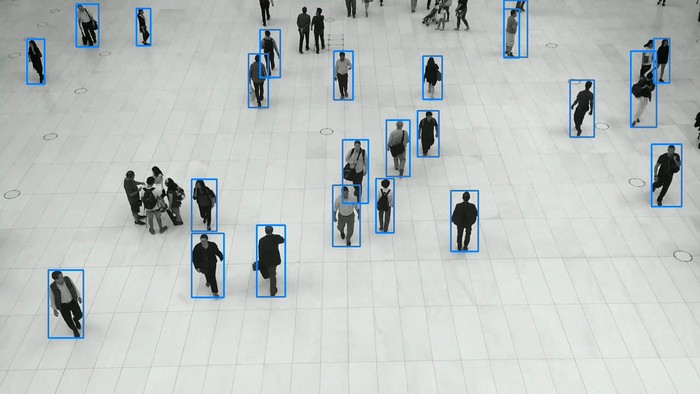
buffer.update(results, frame) stores the new frame and its results, and returns a frame and
its results from earlier: with frames=5, the ones from 2 frames ago. They always belong
together, so the boxes you draw are the right ones for the frame you draw on.
get_temporal_context() returns the buffer around that frame. Above, the count of each frame is
averaged with the 2 frames before it and the 2 after. Because the window is centered on the
frame, the average does not lag behind the crowd, as an average of past frames only would.
The first and last frames
For the first 2 calls, nothing is ready: frame 0 needs frames 1 and 2 after it. update returns
(None, None), hence if frame is not None. From the third call on, it returns frames 0, 1,
2 and so on, in order.
When the video ends, the last 2 frames are still in the buffer, waiting for frames that will
not come. flush() returns them. With both, every frame comes out once: above, 341 frames in,
341 out.
Near the start, a frame has fewer frames before it, and near the end, fewer after it: frame 0
is averaged over 3 frames, not 5. If your processing needs the full window, check the length
of past_results and future_results. pf.smooth does this: it smooths only frames with a
full window, and returns the others as they are.
buffer.delay is how many frames late the output is: frames // 2. A larger buffer gives more
context and a longer delay. Use an odd number of frames, so the frame in the middle has the same
number of frames on each side.
The context
get_temporal_context() describes the frame update or flush returned last. It returns
None before the first one, then a dictionary:
| Key | |
|---|---|
past_frames, past_results |
lists of the frames and results before it, oldest first |
current_frame, current_results |
the frame and results update or flush returned |
future_frames, future_results |
lists of the frames and results after it, oldest first |
The results can be anything you pass to update: Detections, a count or a dictionary of your
own.
get_buffer_contents() returns (results, frames) as two lists, oldest first. reset() empties
the buffer. Calling update after flush() starts again with an empty buffer, so the frames of
the next video do not mix with the last one.
Parameters
pf.Buffer(frames=5):
| Parameter | Default | |
|---|---|---|
frames |
5 |
number of frames to keep, from 1 to 1000; an even number gives a warning |
| Attribute | |
|---|---|
delay |
how many frames late update returns: frames // 2 |
is_full |
whether the buffer holds frames frames |
frames_processed |
number of update calls since the start or the last reset() |
current_size |
number of frames in the buffer now |
Every frame is copied when it enters the buffer: 5 frames of 1280×720 use 14 MB.