Keypoint
A pose model finds points on each object: the eyes, shoulders, elbows and knees of a person.
pf.annotate.keypoint draws a dot on each one.
import pixelflow as pf
from ultralytics import YOLO

model = YOLO("yolo11n-pose.pt")
detections = pf.from_ultralytics(model("street.jpg"))
detections = detections.filter_by_confidence(0.5)

image = pf.read_image("street.jpg")
image = pf.annotate.keypoint(image, detections, min_confidence=0.5)
pf.save_image("street-keypoints.jpg", image)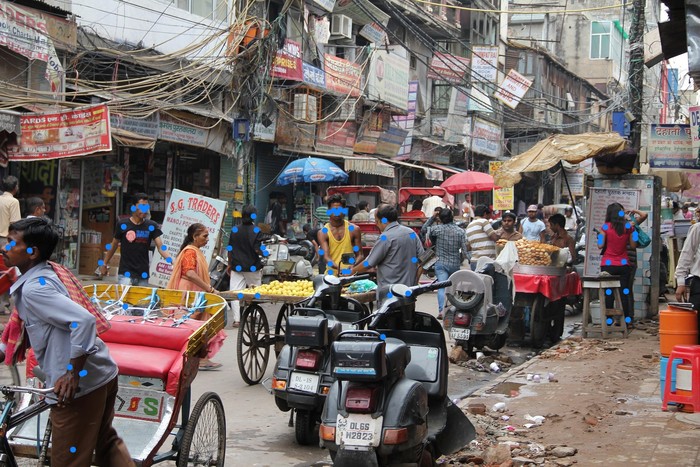
Hide the points the model is unsure about
A pose model returns every point for every person, including the ones it cannot see: a knee
behind a cart still gets a position, with a low score. min_confidence skips the points that score
lower. The default, 0.0, draws them all; the right threshold depends on the model, so try a few
values on your own images. Above, the ankles of the people standing behind the carts score
between 0.04 and 0.17, and 0.5 hides them.
Show the names
show_names=True writes each point's name next to it. Names come from the labels you give the
converter; points without a name are drawn without text. The
skeleton page shows how to name the 17 body points.
To join the points into a stick figure, draw a skeleton first, then the points on top.
Parameters
| Parameter | Default | |
|---|---|---|
image |
RGB image, drawn on in place | |
detections |
the Detections whose keypoints to draw |
|
radius |
from the image size | dot radius in pixels: 8 on a 1920×1280 image |
thickness |
-1 |
-1 fills the dot; a positive number draws a ring that many pixels wide |
colors |
the default palette | list of RGB colors, picked by class_id (see colors) |
show_names |
False |
write each point's name next to it |
min_confidence |
0.0 |
skip points scoring lower than this |