Label
pf.annotate.label writes text on a colored background next to each box. Without other
arguments it writes the class name and the confidence, such as Person: 0.84.
import pixelflow as pf
from mayaku import from_pretrained

predictor = from_pretrained("mayaku-n-det")
result = predictor("street.jpg")
detections = pf.from_mayaku(result, labels=predictor.class_names)
detections = detections.filter_by_confidence(0.5)

image = pf.read_image("street.jpg")
image = pf.annotate.box(image, detections)
image = pf.annotate.label(image, detections, "{class_name} {confidence:.0%}")
pf.save_image("street-labels.jpg", image)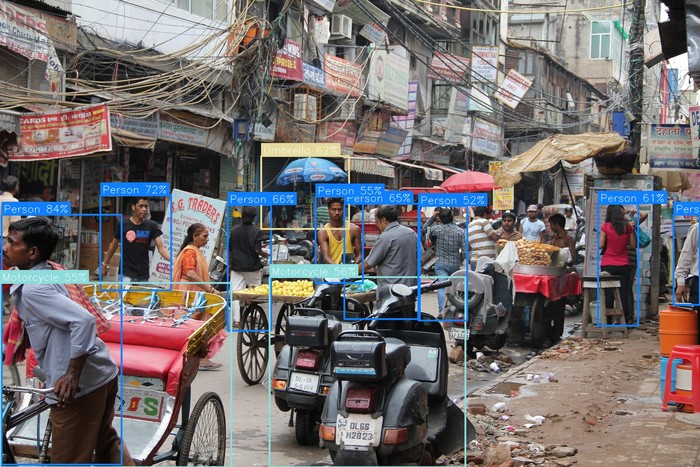
Choose the text
The third argument, texts, sets what each label says:
texts |
Each label says |
|---|---|
None (default) |
the detection's text if it has one (OCR, captions), else its class_name, then its confidence: Person: 0.84 |
| a template string | the template filled with each detection's fields |
| a list of strings | the string at the same position: one per detection |
A template is a Python format string. It can use {class_name}, {confidence}, {class_id},
{tracker_id}, {text} and {bbox}, with the usual format options: {confidence:.0%} gives
84%. A field the detection does not have prints as None.
Add \n for a label on several lines, for example with the tracker id from a
video:
image = pf.annotate.label(image, detections, "#{tracker_id}\n{class_name}")Where labels go
position places the label against the box: "top_left" (default), "top_center",
"top_right", "center_left", "center", "center_right", "bottom_left", "bottom_center"
or "bottom_right". Top labels sit just above the box and bottom labels just below it.
Labels are not moved to stay inside the image: a top label on a box that touches the top edge is cut off. Use a center or bottom position for objects that fill the frame.
Parameters
| Parameter | Default | |
|---|---|---|
image |
RGB image, drawn on in place | |
detections |
the Detections to label |
|
texts |
None |
what each label says (see above) |
position |
"top_left" |
where the label goes against the box |
font_scale |
from the image size | text size: 0.94 on a 1920×1280 image |
padding |
6 |
pixels between the text and the edge of its background |
line_spacing |
2 |
extra pixels between lines |
bg_color |
the class color | one RGB color for every label's background |
text_color |
(255, 255, 255) |
RGB color of the text |
The background takes the same color as the detection's box with the
default palette. label has no colors argument: to match boxes drawn with your own colors,
set one bg_color.