Resize, crop, rotate and flip images and detections
pf.transform changes images: their size, their framing, their orientation or their contrast.
When you have detections for an image, the _detections versions change the image and move the
detections with it, so the boxes still cover the same objects.
import pixelflow as pf
from mayaku import from_pretrained

predictor = from_pretrained("mayaku-n-det")
result = predictor("street.jpg")
detections = pf.from_mayaku(result, labels=predictor.class_names)
detections = detections.filter_by_confidence(0.5)

image = pf.read_image("street.jpg")
crop, inside = pf.transform.crop_detections(image, detections, [600, 400, 1400, 1000])

crop = pf.annotate.box(crop, inside)
pf.save_image("street-crop.jpg", crop)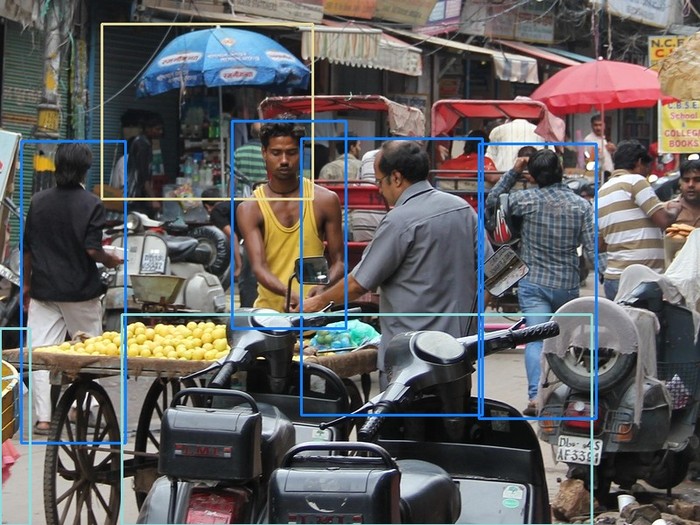
The crop is the area from (600, 400) to (1400, 1000). Of the 11 detections, crop_detections
keeps the 7 whose box overlaps it, with coordinates measured from the crop's top-left corner.
A box that crosses the edge is cut there, so it covers the part of the object that is in the
crop: the motorcycle on the left, which extends 600 pixels past the crop, becomes a box from
x = 0 to 34. A crop area that goes past the image is cut to the image first.
Resize
small = pf.transform.resize(image, width=640)Give width or height, not both: the other follows from the image's shape, so a 1920×1280
image becomes 640×427. When the image already has that size, resize returns the same array,
not a copy; the annotators draw on the array you give them, so copy it first if you need both.
There is no resize_detections. Run the model on the image you will draw on, and resize the
result after drawing.
Image only
These change the image and nothing else:
| Function | Returns |
|---|---|
resize(image, width=None, height=None) |
the image scaled to that width or height |
crop(image, [x1, y1, x2, y2]) |
the area inside the box, cut to the image |
rotate(image, angle, center=None, fillcolor=None) |
the image turned angle degrees counter-clockwise, made larger so nothing is cut |
flip_horizontal(image), flip_vertical(image) |
the mirror image, left to right or top to bottom |
clahe(image, clip_limit=2.0, tile_size=(8, 8)) |
more local contrast, on the lightness only |
auto_contrast(image, cutoff=1.0) |
the darkest cutoff % made black and the brightest white, per channel |
gamma_correction(image, gamma) |
brighter for gamma above 1, darker below 1 |
to_grayscale(image, keep_channels=False) |
a grayscale image: one channel, or three equal ones with keep_channels=True |
normalize(image, mean, std) |
float32 values scaled to 0–1, minus mean, divided by std, for a model's input |
standardize(image) |
float32 values with a mean of 0 and a standard deviation of 1 |
rotate fills the corners it adds by repeating the pixels at the edge of the image; pass
fillcolor=(0, 0, 0) for black instead.
to_grayscale without keep_channels, normalize and standardize return arrays the
annotators and save_image do not take: use them for model input, not for drawing.
Move detections with the image
| Function | Returns |
|---|---|
crop_detections(image, detections, [x1, y1, x2, y2]) |
(image, detections): the crop and the detections that touch it |
rotate_detections(image, detections, angle, center=None, fillcolor=None) |
(image, detections) turned together |
flip_horizontal_detections(image, detections) |
(image, detections) mirrored left to right |
flip_vertical_detections(image, detections) |
(image, detections) mirrored top to bottom |
rotate_to_align(image, detections, point1_name, point2_name, target_angle=0.0, detection_index=0) |
(image, detections) turned so the line between two keypoints of one detection is at target_angle |
They move boxes, masks, outlines and keypoints. Each returns new detections; the ones you pass in do not change.
image = pf.read_image("street.jpg")
image, detections = pf.transform.rotate_detections(image, detections, angle=15, fillcolor=(0, 0, 0))

image = pf.annotate.box(image, detections)
pf.save_image("street-rotated.jpg", image)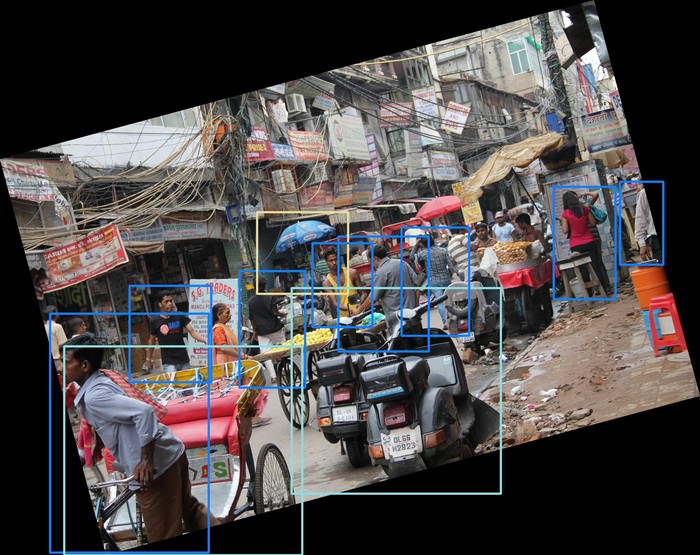
A box stays upright: after a rotation, it becomes the smallest upright box around the turned one, so it is larger than the object. Masks and keypoints follow the object exactly.
crop_detections keeps every keypoint, even outside the crop, so each keypoint stays at its
place in the list; those outside have coordinates below 0 or past the crop's size. Outlines and
polygon masks are moved but not cut either.
Crop around each detection
crop_around_detections returns one image per detection, the area of its box, for example to
save each person or to pass each object to a second model:
crops = pf.transform.crop_around_detections(image, detections, padding=0.2)
for index, crop in enumerate(crops):
    pf.save_image(f"object-{index}.jpg", crop)
padding=0.2 adds 20% of the box's shorter side on every side. Pass a dictionary for different
sides: {"left": 0.2, "right": 0.2, "top": 0.1, "bottom": 0}, as fractions of the box's width
(left and right) and height (top and bottom). Crops stop at the edge of the image.
To make the boxes themselves larger, add_padding(detections, 0.1) returns detections with
every box grown by 10% of its shorter side. Set reference to "longer", "width" or
"height" to measure from another side. A padded box can extend past the image.
update_bbox_from_keypoints(detections, keypoint_names=None) replaces each box with the
smallest box around the detection's keypoints, or only the named ones.
Undo transforms
Each transform records itself in detection.metadata["transforms"]. inverse_transforms reads
that list and undoes it, last transform first, to bring detections back to the coordinates of
the original image:
crop, inside = pf.transform.crop_detections(image, detections, [600, 400, 1400, 1000])
original = pf.transform.inverse_transforms(inside)
Every transform is undone exactly: the boxes come back as they were before the first transform, and masks come back at the size of the original image. On the street photo, the 10 detections left after a 15° rotation, a crop and 10% padding all come back to their original boxes.
A box loses information in a rotation, which makes it larger, and in a crop, which cuts it, so
each transform also records the box as it was. If you change a box between the transforms and
inverse_transforms, that record no longer applies, and the box is mapped back by geometry
alone: after a rotation, it comes back as the upright box around the turned-back box, larger
than the object.
It works on detections that went through the transforms, not on new results from a model you run on the transformed image: those have no history.