Draw results on images
Every drawing function lives in pf.annotate and takes the same two things: the image, and the
results to draw. Each one draws one kind of mark (boxes, labels, masks...), so you build a picture
by calling them one after the other.
import pixelflow as pf
from mayaku import from_pretrained

predictor = from_pretrained("mayaku-n-seg")
result = predictor("street.jpg")
detections = pf.from_mayaku(result, labels=predictor.class_names)
detections = detections.filter_by_confidence(0.5)

image = pf.read_image("street.jpg")
image = pf.annotate.mask(image, detections)
image = pf.annotate.box(image, detections)
image = pf.annotate.label(image, detections)
pf.save_image("street-annotated.jpg", image)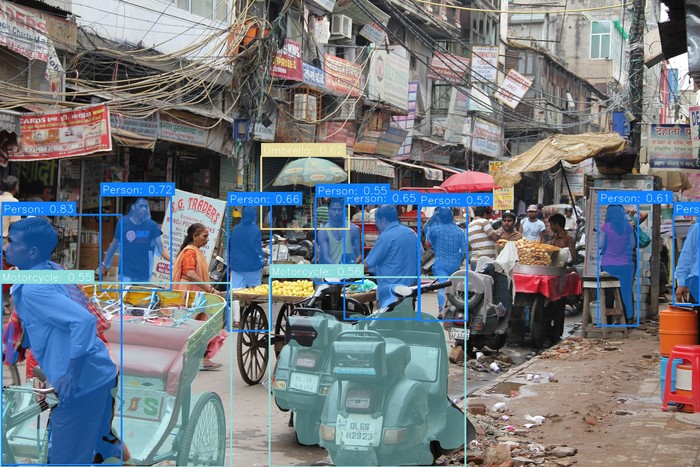
Order matters
Each call paints over what is already there. Draw the large, see-through marks first (masks, filled boxes, zones) and the small, solid ones last (boxes, then labels), so the labels stay readable.
Drawing changes the image you pass in
The functions draw directly on the array you give them and return that same array. This avoids a copy of every frame in a video, but it also means the original is gone. Pass a copy when you still need it:
original = pf.read_image("street.jpg")
annotated = pf.annotate.box(original.copy(), detections)
Images are RGB, as pf.read_image and pf.VideoReader return
them. An image read with cv2.imread is BGR: the drawing works, but every color comes out with
red and blue swapped.
Sizes follow the image
Line widths, font sizes, blur strength and the other sizes are worked out from the image size, so
the same code gives readable marks on a 640×480 frame and on a 4K photo. On the 1920×1280 photo
above, lines are 4 pixels wide. Every function takes the size as an argument (thickness,
font_scale, radius...) when you want to set it yourself.
Colors follow the class
Each detection takes its color from its class_id, so every person has the same color, in every
function and in every frame of a video. With the default palette of 20 colors, class n gets
color n % 20. A detection without a class_id gets the first color.
Pass colors to use your own list of RGB colors, with the same rule:
image = pf.annotate.box(image, detections, colors=pf.colors.PASTEL_PALETTE)
image = pf.annotate.box(image, detections, colors=[(255, 0, 0)])  # everything red
pf.colors has three palettes: DEFAULT_PALETTE, VIBRANT_PALETTE and PASTEL_PALETTE.
All drawing functions
| Function | Draws | Needs |
|---|---|---|
box |
the outline of each box | boxes |
filled_box |
see-through filled boxes | boxes |
label |
text next to each box | boxes |
mask |
see-through masks | masks |
polygon |
the outline of each object | outlines |
oval |
an ellipse under each object | boxes |
anchors |
dots at the corners, center or edges of each box | boxes |
keypoint |
a dot on each keypoint | keypoints |
keypoint_skeleton |
lines between keypoints | named keypoints |
classification |
the top classes in a corner | classifications |
blur |
each box blurred | boxes |
pixelate |
each box pixelated | boxes |
zones |
zones and their counts | Zones |
crossings |
lines and their in/out counts | Crossings |
grid_overlay |
a grid inside each box | boxes |
fps_counter |
frames per second | a video loop |