FPS counter
When a model runs on a camera or a video, you want to know if it keeps up. pf.annotate.fps_counter
writes the current frames per second in the top-left corner of each frame.
import pixelflow as pf
from mayaku import from_pretrained

predictor = from_pretrained("mayaku-n-det")

video = pf.VideoReader("crowd.mp4")
with pf.VideoWriter("crowd-fps.mp4", like=video) as writer:
    for frame in video:
        result = predictor(frame[:, :, ::-1])  # Mayaku reads arrays as BGR
        detections = pf.from_mayaku(result, labels=predictor.class_names)
        detections = detections.filter_by_confidence(0.5)

        frame = pf.annotate.box(frame, detections)
        frame = pf.annotate.fps_counter(frame, detections)
        writer.write(frame)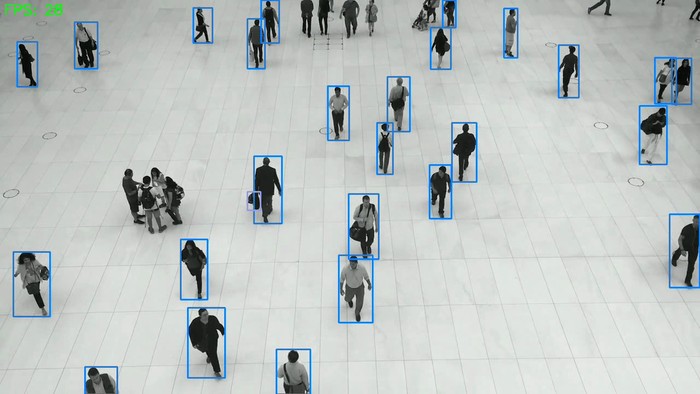
The number is the time between this call and the previous one, turned into frames per second:
it covers everything the loop does, model, drawing and writing included. Above, mayaku-n-det on
a 1280×720 video, on the GPU of an Apple M1 Max, ran at about 28 frames per second. The number
is measured over a single frame, so it moves a little from one frame to the next. The first
frame shows 0.
Call fps_counter once per frame. It keeps its timer between calls, shared by the whole program:
with two videos in the same loop, each would count the frames of both.
The second argument, detections, is not used; pass the frame's detections, as above.
Parameters
| Parameter | Default | |
|---|---|---|
image |
RGB image, drawn on in place | |
detections |
not used | |
thickness |
from the image size | text stroke width in pixels; setting it also sets the text size to 1 |