Keypoint skeleton
Dots alone make it hard to tell which point belongs to which person. pf.annotate.keypoint_skeleton
joins them with lines: shoulder to elbow, elbow to wrist, hip to knee.
import pixelflow as pf
from ultralytics import YOLO

# The 17 COCO body keypoints, in the order the model returns them
COCO_KEYPOINTS = [
    "nose", "left_eye", "right_eye", "left_ear", "right_ear",
    "left_shoulder", "right_shoulder", "left_elbow", "right_elbow",
    "left_wrist", "right_wrist", "left_hip", "right_hip",
    "left_knee", "right_knee", "left_ankle", "right_ankle",
]
labels = [{"id": 0, "name": "person", "keypoints": [{"name": name} for name in COCO_KEYPOINTS]}]

model = YOLO("yolo11n-pose.pt")
detections = pf.from_ultralytics(model("street.jpg"), labels=labels)
detections = detections.filter_by_confidence(0.5)

image = pf.read_image("street.jpg")
image = pf.annotate.keypoint_skeleton(image, detections, min_confidence=0.5)
image = pf.annotate.keypoint(image, detections, min_confidence=0.5)
pf.save_image("street-skeletons.jpg", image)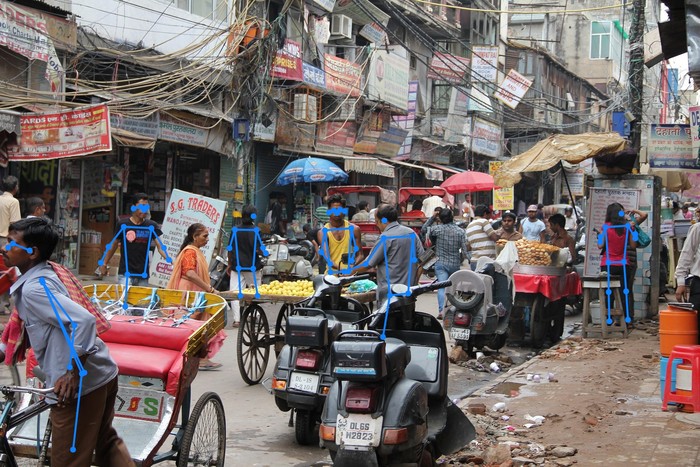
Keypoints need names
The skeleton connects points by name: ("left_shoulder", "left_elbow"). The model returns its
points as a list without names, so tell the converter what they are, with labels in the form
above: for each class, its id, its name and its keypoints in order. Without names, nothing is
drawn and there is no error.
Your own connections
The default connections are the COCO body skeleton, for the 17 points above. For any other model,
such as a hand or an animal, list the pairs to join, using the names you gave in labels:
hand = [("wrist", "thumb_tip"), ("wrist", "index_tip"), ("wrist", "pinky_tip")]
image = pf.annotate.keypoint_skeleton(image, detections, connections=hand)
A pair is skipped when one of its points is missing, or when one of them scores below
min_confidence.
Parameters
| Parameter | Default | |
|---|---|---|
image |
RGB image, drawn on in place | |
detections |
the Detections whose keypoints to join |
|
connections |
the COCO body skeleton | list of (name, name) pairs to join |
thickness |
from the image size | line width in pixels: 4 on a 1920×1280 image |
colors |
the default palette | list of RGB colors, picked by class_id (see colors) |
min_confidence |
0.0 |
skip a line unless both of its points score at least this |