Grid overlay
pf.annotate.grid_overlay divides each box into a grid of cells. It draws only the lines inside
the box, not its edge, so it is usually drawn together with box.
import pixelflow as pf
from mayaku import from_pretrained

predictor = from_pretrained("mayaku-n-det")
result = predictor("street.jpg")
detections = pf.from_mayaku(result, labels=predictor.class_names)
detections = detections.filter_by_confidence(0.5)

image = pf.read_image("street.jpg")
image = pf.annotate.box(image, detections)
image = pf.annotate.grid_overlay(image, detections)
pf.save_image("street-grid.jpg", image)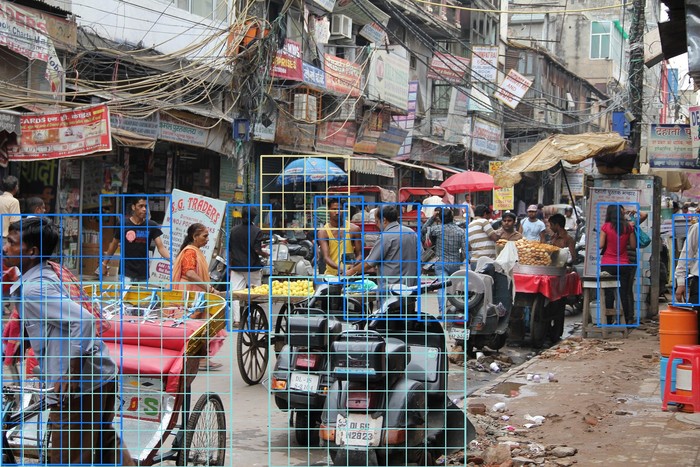
Without grid_size, each box gets one row and one column for every 50 pixels of its shorter
side, from 2 to 10. Pass grid_size=(rows, cols) to use the same grid for every box.
filled=True fills every other cell, as a see-through checkerboard:
image = pf.annotate.grid_overlay(image, detections, grid_size=(4, 4), filled=True)Parameters
| Parameter | Default | |
|---|---|---|
image |
RGB image, drawn on in place | |
detections |
the Detections to draw grids in |
|
grid_size |
from each box's size | (rows, cols), at least 2 each |
thickness |
from the image size | line width in pixels, half that of box: 2 on a 1920×1280 image |
colors |
the default palette | list of RGB colors, picked by class_id (see colors) |
filled |
False |
fill every other cell |
opacity |
0.25 |
fill opacity when filled=True, from 0 to 1 |