Polygon
pf.annotate.polygon draws the outline of each object as a line. It shows the shape as clearly as
a mask and leaves the object itself uncovered.
import pixelflow as pf
from mayaku import from_pretrained

predictor = from_pretrained("mayaku-n-seg")
result = predictor("street.jpg")
detections = pf.from_mayaku(result, labels=predictor.class_names)
detections = detections.filter_by_confidence(0.5)
detections.masks_to_segments()

image = pf.read_image("street.jpg")
image = pf.annotate.polygon(image, detections)
pf.save_image("street-outlines.jpg", image)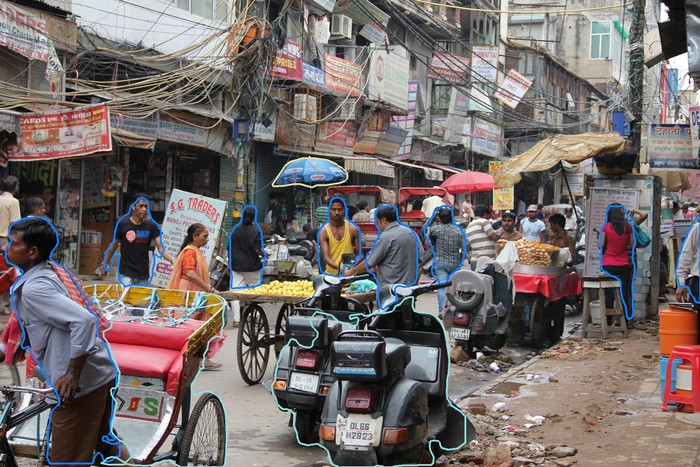
polygon draws each detection's segments, its outline as [[x, y], ...] points. Mayaku gives
masks, so masks_to_segments() traces an outline from each mask first. Some converters fill
segments directly, such as from_ultralytics for segmentation models and from_easyocr for
text: those need no extra step. Detections without an outline are skipped.
See masks and outlines for how outlines are made.
Parameters
| Parameter | Default | |
|---|---|---|
image |
RGB image, drawn on in place | |
detections |
the Detections whose outlines to draw |
|
thickness |
from the image size | line width in pixels: 4 on a 1920×1280 image |
colors |
the default palette | list of RGB colors, picked by class_id (see colors) |