Classification
A classifier names what the whole image shows, without boxes, so there is nothing to draw on.
pf.annotate.classification writes its best answers in a corner instead, one row per class.
import torch
import pixelflow as pf
from torchvision.models import resnet18, ResNet18_Weights

weights = ResNet18_Weights.DEFAULT
model = resnet18(weights=weights).eval()
preprocess = weights.transforms()

image = pf.read_image("street.jpg")
batch = preprocess(pf.to_pil(image)).unsqueeze(0)
with torch.no_grad():
    probabilities = model(batch).softmax(dim=-1)[0]
result = pf.from_scores(probabilities, labels=weights.meta["categories"])

image = pf.annotate.classification(image, result, top_k=3)
pf.save_image("street-classes.jpg", image)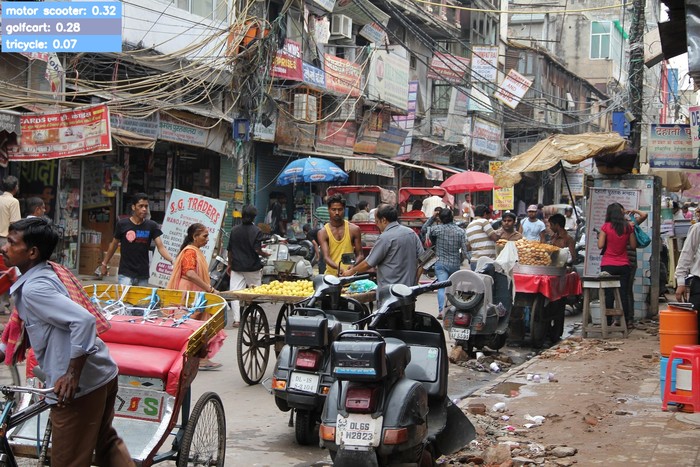
The rows are the top_k best classes, best first, each written as its name and score. Each row
takes the color of its class, as boxes do. See
classifications for where result comes from.
Parameters
| Parameter | Default | |
|---|---|---|
image |
RGB image, drawn on in place | |
classifications |
the Classifications to write |
|
top_k |
1 |
how many classes to write, best first |
position |
"top_left" |
the corner: "top_left", "top_right", "bottom_left" or "bottom_right" |
font_scale |
from the image size | text size: 0.94 on a 1920×1280 image |
text_color |
(255, 255, 255) |
RGB color of the text |
bg_color |
the class color | one RGB color for every row's background |
padding |
from the image size | pixels between the text and the edge of its row: 12 on a 1920×1280 image |