Detect small objects in large images
A detection model shrinks every image to its input size before it looks at it. In a large
photo, a person at the back of the scene becomes a few pixels and is missed. SlicedInference
cuts the image into overlapping slices, runs the model on each one at full resolution, and
merges the results into one Detections for the whole image.
import pixelflow as pf
from mayaku import from_pretrained

predictor = from_pretrained("mayaku-n-det")


def detect(tile):
    result = predictor(tile[:, :, ::-1])  # Mayaku reads arrays as BGR
    detections = pf.from_mayaku(result, labels=predictor.class_names)
    return detections.filter_by_confidence(0.5)


image = pf.read_image("street.jpg")
slicer = pf.SlicedInference(slice_width=640, slice_height=640)
detections = slicer.predict(image, detect)

print(len(detect(image)), len(detections))

image = pf.annotate.box(image, detections)
pf.save_image("street-sliced.jpg", image)11 26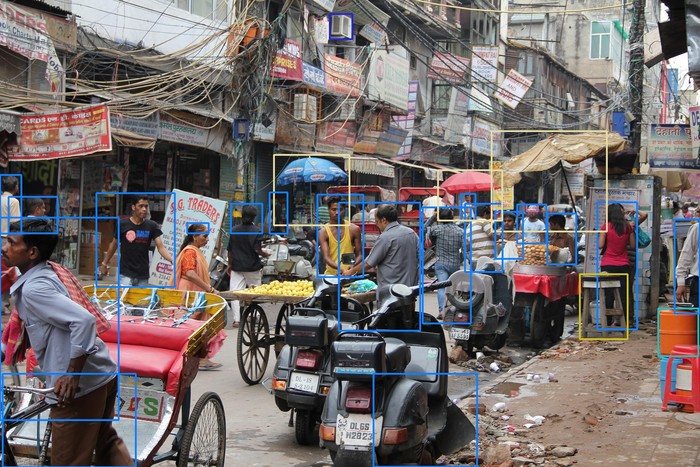
predict takes the image and a function that turns one slice into Detections. It calls that
function once per slice, here 12 times for 4 columns and 3 rows, and moves each detection from
slice to image coordinates: its box, and its mask, outline and keypoints if it has them. A mask
is placed on an image-sized canvas, so with a segmentation model such as mayaku-n-seg,
pf.annotate.mask draws the result on the whole image.
On the whole 1920×1280 image, the model finds 11 objects with a confidence of 0.5 or more, 8 of them people. On the slices it finds 26, 19 of them people, most at the back of the street.
What slicing costs
The model runs once per slice. Above, on the GPU of an Apple M1 Max, the 12 slices took 345 ms and one pass on the whole image 35 ms.
Large objects suffer. An object that crosses the edge of a slice is seen in pieces: in the image above, the man in the front gets two partial boxes, and the two motorcycles found on the whole image are not found at all, since no slice holds enough of either. A piece can also be mistaken for something else: the box at the bottom, labelled a person, is the back of a scooter. Use slicing when the objects you want are small compared to the image, such as people in a wide view, vehicles in an aerial photo or defects on a large scan.
The function must return Detections: convert the model's output inside it, as above.
Anything else raises a TypeError.
Slice size and overlap
Make slices about the size the model works at: 640 pixels for most models. Smaller slices find smaller objects but take more runs and cut more objects.
Slices overlap by 20% of their size by default, so an object on the edge of one slice is whole
in the next. Raise overlap_ratio_w and overlap_ratio_h when objects are cut too often; it
also adds slices.
pf.auto_slice_size(height, width) gives a slice size with the image's shape: for a
1920×1280 image, 426 pixels high and 640 wide, which makes 16 slices.
slice_height, slice_width = pf.auto_slice_size(*image.shape[:2])
slicer = pf.SlicedInference(slice_height=slice_height, slice_width=slice_width)
How duplicates are merged
An object inside an overlap is found twice, once in each slice. predict keeps one, going
from the highest confidence down, and compares only boxes of the same class:
- boxes from neighbouring slices overlapping with an IoU above 0.7 ×
iou_threshold(0.35 by default) are the same object; - other boxes are the same object above
iou_threshold; - a box that lies more than
ios_threshold(90% by default) inside another box of the same class is removed.
IoU is the area two boxes share divided by the area they cover together. With
merge_mode="nmm", duplicates from neighbouring slices are replaced by their average box,
weighted by confidence, instead of keeping only the best one.
Parameters
pf.SlicedInference(...):
| Parameter | Default | |
|---|---|---|
slice_height |
640 |
slice height in pixels |
slice_width |
640 |
slice width in pixels |
overlap_ratio_h |
0.2 |
vertical overlap between slices, from 0 to 0.9 |
overlap_ratio_w |
0.2 |
horizontal overlap between slices, from 0 to 0.9 |
iou_threshold |
0.5 |
IoU above which two boxes are the same object |
ios_threshold |
0.9 |
share of a box inside another above which it is removed |
merge_mode |
"nms" |
"nms" keeps the best box, "nmm" averages duplicates |
slicer.predict(image, detector_func, verbose=False, **detector_kwargs):
| Parameter | Default | |
|---|---|---|
image |
RGB image | |
detector_func |
function that takes a slice (an RGB array) and returns Detections |
|
verbose |
False |
print the number of detections per slice |
**detector_kwargs |
passed on to detector_func |