Anchors
An anchor is a point on a box: its center, a corner or the middle of an edge.
Zones and line crossings decide where
an object is from its anchor, often "bottom_center", where it touches the ground.
pf.annotate.anchors draws these points, so you can see which point is being tested.
import pixelflow as pf
from mayaku import from_pretrained

predictor = from_pretrained("mayaku-n-det")
result = predictor("street.jpg")
detections = pf.from_mayaku(result, labels=predictor.class_names)
detections = detections.filter_by_confidence(0.5)

image = pf.read_image("street.jpg")
image = pf.annotate.box(image, detections)
image = pf.annotate.anchors(image, detections)
pf.save_image("street-anchors.jpg", image)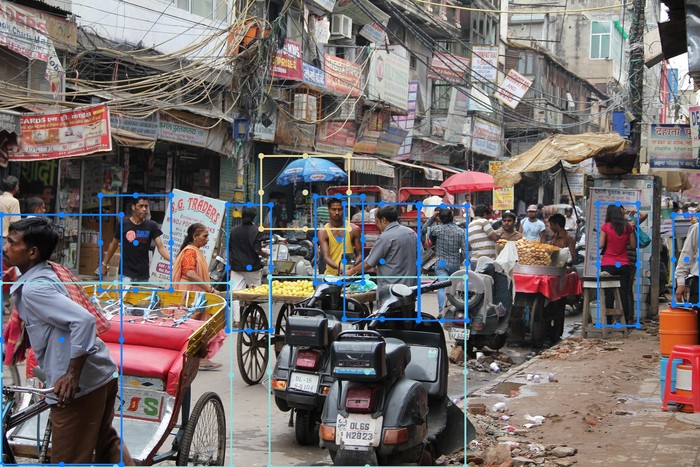
Without strategy, every box gets all nine points. Name one or more to draw only those:
image = pf.annotate.anchors(image, detections, strategy="bottom_center")
image = pf.annotate.anchors(image, detections, strategy=["center", "bottom_center"])
strategy |
Point |
|---|---|
"center" |
the middle of the box |
"top_left", "top_right", "bottom_left", "bottom_right" |
a corner |
"top_center", "bottom_center", "left_center", "right_center" |
the middle of an edge |
Parameters
| Parameter | Default | |
|---|---|---|
image |
RGB image, drawn on in place | |
detections |
the Detections to mark |
|
strategy |
None (all nine) |
one point name, or a list of them |
radius |
from the image size | dot radius in pixels: 8 on a 1920×1280 image |
thickness |
-1 |
-1 fills the dot; a positive number draws a ring that many pixels wide |
colors |
the default palette | list of RGB colors, picked by class_id (see colors) |