Crossings
A crossing is a line that counts the tracked objects passing over it, in each direction.
pf.annotate.crossings draws every line of a pf.Crossings object with its two counts.
import pixelflow as pf
from mayaku import from_pretrained

predictor = from_pretrained("mayaku-n-det")
tracker = pf.tracker.ByteTracker()
crossings = pf.Crossings()
crossings.add_crossing(start=(0, 360), end=(1280, 360), name="Middle", color=(255, 160, 0))

video = pf.VideoReader("crowd.mp4")
with pf.VideoWriter("crowd-crossings.mp4", like=video) as writer:
    for frame in video:
        result = predictor(frame[:, :, ::-1])  # Mayaku reads arrays as BGR
        detections = pf.from_mayaku(result, labels=predictor.class_names)
        detections = tracker.update(detections.filter_by_confidence(0.5))
        crossings.update(detections)

        frame = pf.annotate.box(frame, detections)
        frame = pf.annotate.crossings(frame, crossings)
        writer.write(frame)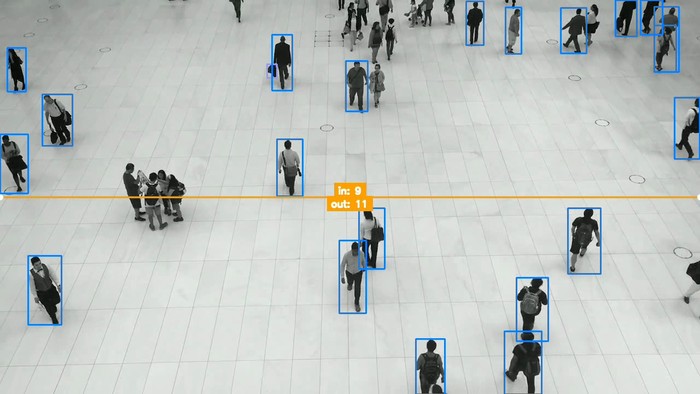
The image is the last of the 341 frames: over the video, 9 people crossed the line one way and 11 the other.
Each line is drawn with a dot at both ends and its counts in the middle. Draw after
crossings.update(), so the counts include the current frame. Counting needs tracker ids, which is
why the loop runs the tracker first; see
count objects crossing a line for which way is "in".
Give each line a color when you add it: without one, every line is drawn in the same red.
Parameters
| Parameter | Default | |
|---|---|---|
image |
RGB image, drawn on in place | |
crossings_manager |
the pf.Crossings to draw |
Line width and text size follow the image size; the text is white on the line's color.